Showing posts with label gnome-settings-daemon. Show all posts

Wednesday, 20 October 2021

PSA: gnome-settings-daemon's MediaKeys API is going away

 In 2007, Jan Arne Petersen added a D-Bus API to what was still pretty much an import into gnome-control-center of the "acme" utility I wrote to have all the keys on my iBook working.

It switched the code away from remapping keyboard keys to "XF86Audio*", to expecting players to contact the D-Bus daemon and ask to be forwarded key events.


Multimedia keys circa 2003

In 2013, we added support for controlling media players using MPRIS, as another interface. Fast-forward to 2021, and MPRIS support is ubiquitous, whether in free software, proprietary applications or even browsers. So we'll be parting with the "org.gnome.SettingsDaemon.MediaKeys" D-Bus API. If your application still wants to work with older versions of GNOME, it is recommended to at least quiet the MediaKeys API's unavailability.


Multimedia keys in 2021
 

TL;DR: Remove code that relies on gnome-settings-daemon's MediaKeys API, make sure to add MPRIS support to your app.

Tuesday, 9 August 2016

Blog backlog, Post 4, Headset fixes for Dell machines

At the bottom of the release notes for GNOME 3.20, you might have seen the line:
If you plug in an audio device (such as a headset, headphones or microphone) and it cannot be identified, you will now be asked what kind of device it is. This addresses an issue that prevented headsets and microphones being used on many Dell computers.
Before I start explaining what this does, as a picture is worth a thousand words:


This selection dialogue is one you will get on some laptops and desktop machines when the hardware is not able to detect whether the plugged in device is headphones, a microphone, or a combination of both, probably because it doesn't have an impedance detection circuit to figure that out.

This functionality was integrated into Unity's gnome-settings-daemon version a couple of years ago, written by David Henningsson.

The code that existed for this functionality was completely independent, not using any of the facilities available in the media-keys plugin to volume keys, and it could probably have been split as an external binary with very little effort.

After a bit of to and fro, most of the sound backend functionality was merged into libgnome-volume-control, leaving just 2 entry points, one to signal that something was plugged into the jack, and another to select which type of device was plugged in, in response to the user selection. This means that the functionality should be easily implementable in other desktop environments that use libgnome-volume-control to interact with PulseAudio.

Many thanks to David Henningsson for the original code, and his help integrating the functionality into GNOME, Bednet for providing hardware to test and maintain this functionality, and Allan, Florian and Rui for working on the UI notification part of the functionality, and wiring it all up after I abandoned them to go on holidays ;)

Sunday, 10 January 2016

Support for "Airplane mode" keys

As we were working on audio jack notifications, and were wondering whether the type of notification we'd pop up in this case could be reused in other cases, I encountered a feature request that could now be solved easily with the rfkill D-Bus service we added to gnome-settings-daemon for the 3.10 release.

If you have keyboard buttons on your laptop to enable or disable Bluetooth, or Airplane mode, you can now use them. Note that the "UWB" toggle key will toggle the whole airplane mode mainly because no in-kernel driver uses it, and nobody remembers what UWB is.

Note that the labels and icons used are still subject to changes. In particular as you can see that the labels are too long for lower resolutions.


Saturday, 1 November 2014

Hardware support news

Trackballs

I dusted off (literally) my Logitech Marble trackball to replace the Intuos tablet + mouse combination that I was using to cut down on the lateral movement of my right arm which led to back pains.

Not that you care about that one bit, but that meant that I needed a way to get a scroll wheel working with this scroll-wheel less trackball. That's now implemented in gnome-settings-daemon for GNOME 3.16. You'd run:


gsettings set org.gnome.settings-daemon.peripherals.trackball scroll-wheel-emulation-button 8

With "8" being the mouse button number to use to make the trackball ball into a wheel. We plan to add an interface to configure this in the Settings.

Touchscreens

Touchscreens are now switched off when the screensaver is on. This means you'll usually need to use one of the hardware buttons on tablets, or a mouse or keyboard on laptops to turn the screen back on.

Note that you'll need a kernel patch to avoid surprises when the touchscreen is re-enabled.

More touchscreens

The driver for the Goodix touchscreen found in the Onda v975w is now upstream as well.

Wednesday, 25 June 2014

Firewalls and per-network sharing

Firewalls

Fedora has had problems for a long while with the default firewall rules. They would make a lot of things not work (media and file sharing of various sorts, usually, whether as a client or a server) and users would usually disable the firewall altogether, or work around it through micro-management of opened ports.

We went through multiple discussions over the years trying to break the security folks' resolve on what should be allowed to be exposed on the local network (sometimes trying to get rid of the firewall). Or rather we tried to agree on a setup that would be implementable for desktop developers and usable for users, while still providing the amount of security and dependability that the security folks wanted.

The last round of discussions was more productive, and I posted the end plan on the Fedora Desktop mailing-list.

By Fedora 21, Fedora will have a firewall that's completely open for the user's applications (with better tracking of what applications do what once we have application sandboxing). This reflects how the firewall was used on the systems that the Fedora Workstation version targets. System services will still be blocked by default, except a select few such as ssh or mDNS, which might need some tightening.

But this change means that you'd be sharing your music through DLNA on the café's Wi-Fi right? Well, this is what this next change is here to avoid.

Per-network Sharing

To avoid showing your music in the caf, or exposing your holiday photographs at work, we needed a way to restrict sharing to wireless networks where you'd already shared this data, and provide a way to avoid sharing in the future, should you change your mind.

Allan Day mocked up such controls in our Sharing panel which I diligently implemented. Personal File Sharing (through gnome-user-share and WedDAV), Media Sharing (through rygel and DLNA) and Screen Sharing (through vino and VNC) implement the same per-network sharing mechanism.

Make sure that your versions of gnome-settings-daemon (which implements the starting/stopping of services based on the network) and gnome-control-center match for this all to work. You'll also need the latest version of all 3 of the aforementioned sharing utilities.

(and it also works with wired network profiles :)


Thursday, 17 October 2013

More power management changes

As is becoming common, we will have some more power management changes in GNOME 3.12, though those changes will also affect other desktops, whether they use UPower's D-Bus interface, or libupower-glib, the helper library.

The goals of the exercise were simple:

  • reduce wake-ups on the daemon and on the client side
  • reduce code duplication amongst desktop environments, and even within the same environment (composite battery, anyone?)
  • moving some policy actions to a lower level (one could not request hibernation or suspend when multiple users were logged in without interaction and passwords)
All those changes are now in UPower master ready for testing.

Out with the old

The deprecated interfaces for Suspend, Hibernate, etc. are finally removed, after being obsoleted by logind. We've also removed the QoS interface that nobody was using, and the out-dated battery recall support. It's not that batteries don't explode any more, it's that they don't all come from known-bad batches.

In with the new

We have 2 new properties on each of the devices.

WarningLevel which uses daemon-side configurations to tell you whether a device's battery level is low, critically low, or whether we're about to take action on that critical level.

We also have IconName, which replaces some cut'n'pasted code between desktop components. If your desktop environment has many more icons for all types of devices on low battery, for example, you can ignore this property and use the code you always have.

Using those new properties usefully is the new DisplayDevice object. It groups all the batteries and UPSes in the daemon into one, easy to use object that you can use to display a single status icon in your shell chrome. Obviously, if you want to show more devices, the individual batteries and UPSes are still available through the usual means. And it obviously has the 2 new properties mentioned above, so your session daemon can get told when to show notifications for low batteries.

And finally, using that new combined DisplayDevice is the critical battery action policies. As mentioned above, multi-user systems could not hibernate without requiring the user to enter an administrator password, which is less than convenient when your machine is running out of UPS power fast. The configuration for that policy is now in the daemon itself, with sane defaults, and it will hibernate the machine for you.

And to the modernisation

libupower-glib now uses GDBus, even if the daemon doesn't. The daemon however sends PropertiesChanged signals which means that modern D-Bus bindings will automatically get the new values for properties, instead of polling the daemon. The DeviceChanged and Changed signals have thus been removed.

API changes

They are numerous, too many to mention here. I've posted to the device-kit mailing-list with a list of changes that were made, reply there if you have any questions regarding using UPower in your application or session daemons.

Miscellaneous

systemd >= 207 will save your brightness settings across reboots, and the upcoming systemd 209 will have support for saving keyboard backlight across reboots.

I've made attempts at supporting Intel Rapid Start in systemd, but this will actually require kernel changes. Hopefully we should be able to land this by the time GNOME 3.12 is released.

Monday, 23 September 2013

GNOME 3.10 is coming!

The new release is coming! As has been the case for the past couple of releases, I've mostly been shepherding great work by other contributors, and I'll detail my limited contributions beyond mere bug fixing.

Wayland support

I've done some work on enabling clutter-gtk applications to be able to run on  Wayland though the harder work of implementing sub-surfaces is still pending.

Giovanni has done incredible work on mutter to start moving some of the X11 dependent code inside the compositor, which should allow you to run a (cut down) Wayland session using gnome-shell.

This also means that Thomas Wood's redesigned Displays panel has Wayland support. A perfect storm of changes for one of the only panels that received little attention since the GNOME 2.x days.


The new displays panel with a TV that claims to be oh so small


Date & Time redesign

Zeeshan, through his work on Geoclue2, and Kalev, through his Summer of Code project, have completely redesigned the Date & Time panel. Aside from being easier to setup, it means that we can finally implement the automatic timezone switching depending on your location.


The new Date & Time panel


BlueZ 5 support

GNOME is the first major desktop to ship with BlueZ 5 support, thanks to work by Gustavo Padovan and Emilio Pozuelo Monfort.

The older version was not supported anymore, and the new version allows us to support things like "Just Works" pairing, better support of audio devices (though the PulseAudio 5.x release to support this is only coming shortly after GNOME 3.10) and a much better architecture for a more stable operation.

GNOME 3.12 should see a redesigned Bluetooth panel, to match current best practices on other platforms (such as merging the management and pairing wizard UIs into one).


Bluetooth devices in use


Miscellaneous


Intuos 4 OLEDs

OLED support for Wacom Intuos 4 tablets (as seen above, thanks Przemo), media keys support for MPRIS applications such as Spotify (thanks to Michael Wood and Lars Uebernickel), updated UI for the Universal Access panel (the ever present Matthias Clasen), support for many more fingerprint readers in libfprint (thanks Vasily Khoruzhick).


Redesigned Universal Access panel


And to my contributions

More work on Videos. Totem 3.10 is still based on the same interface as in GNOME 3.8, but some work has been on the master branch towards the new UI, with some of the features getting backported. We have:
  • new session management for when Totem crashes
  • support for chapters within files (such as Matroska videos)
  • Wayland bug fixes in GTK+, clutter and the combined clutter-gtk
  • a completed GDBus port
  • Working overlaid controls (though their behaviour isn't quite up to scratch)
  • Remote files support in Grilo, including support for Recent files
  • Started work on merging the various sidebars within the main view (which included landing GtkSearchBar in GTK+)
  • libquvi 0.9 support
On top of which you'll find the usual mix of bug fixes, small featuresitch scratching, and swamp-draining in finger-pointing fests.

I also spent quite a bit of time on a side project that didn't come to fruition at this time, but I hope to be able to post some details soon.

Friday, 1 February 2013

Power management in GNOME 3.8

In the past couple of weeks, apart from reviewing very many patches for gnome-control-center (especially for new and re-designed panels), I've been working on updating the power management handling in GNOME.

Test suite

The first change is that we have a test suite (currently with 15 separate tests) to test interaction between gnome-settings-daemon's power management and various session and system components. This is thanks to Martin Pitt, and his work on python-dbusmock.

We'll try and add new tests as bug reports come in to avoid regressions, although some cases will remain untested because of limitations in our logging.

 All clear

Screensaver and backlight interaction

With gnome-shell becoming the sole screensaver (after the removal of fallback mode, and the obsoletion of gnome-screensaver), we've been able to streamline the code handling the various screen backlight power levels.

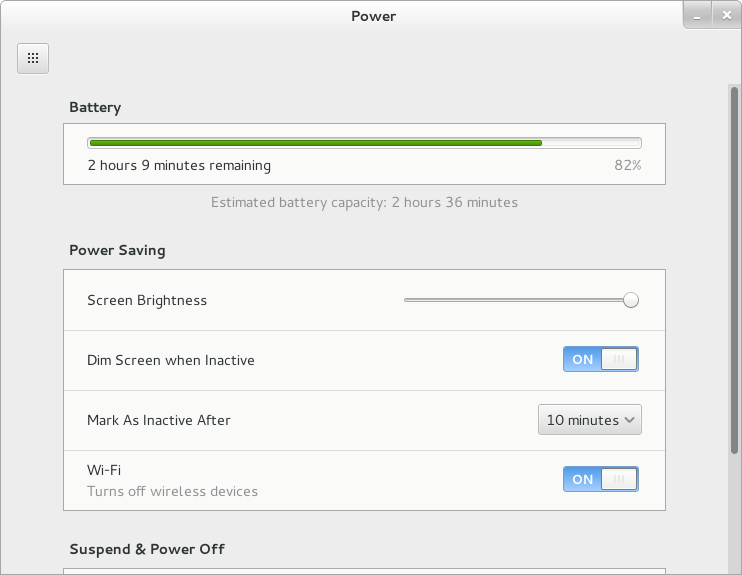
Your screen will now turn off as soon as the screensaver kicks in, moving your mouse in the screensaver will turn it back on for 20 seconds before turning off again, and when to dim (if you've chosen so) is dependent on whether you're on battery or not, and the default idle time (eg. if your screen turns off after 5 minutes of inactivity, the screen will dim after 4). This makes the behaviour more consistent, and predictable, compared to the mish-mash of settings we had before, where some delays were available for change in the UI, and others only through GSettings or gnome-tweak-tool.

Those constants are separate from the code, and exported to the test suite so they are flexible and can be changed if the behaviour doesn't exactly match what users are expecting.

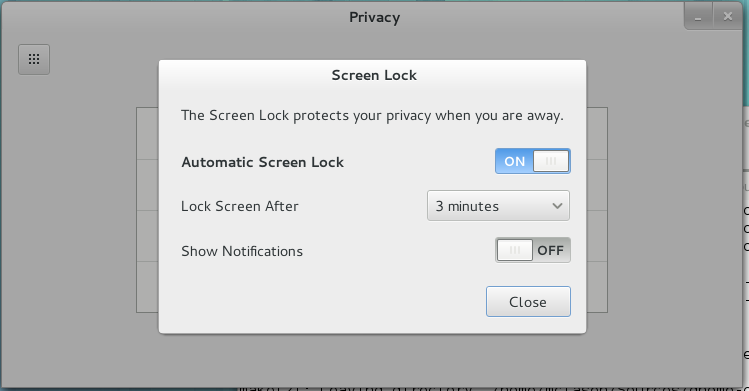
The other change relating to that, is that the screen shield will now always pop down when the screensaver kicks in (thanks to Giovanni for the gnome-shell work). This doesn't mean that you'll have to enter your password each time, but only after the "lock delay" if you've set one.

We've also added a number of nice touches, like the screen turning back on for a short period when you plug or unplug your laptop, made sure that your laptop screen gets turned off and your session locked when closing the lid and turn off the backlight for machines where suspend causes the backlight to come back on temporarily (as seen on MacBooks).

Very very idle

We've also added a long-requested feature: the ability to force logout after a period of idle. This is useful in kiosk and computer lab situations, and is only available through GSettings. As we've added support for this feature (warning prior to logging out, with the screen turning on for a couple of seconds when the warning shows up), we've realised that the infrastructure is the same for automatic suspend/hibernate situation. This means I expect to change the default "long idle" behaviour to suspending. This will still be changeable in the Power preferences. This should land after 3.7.5, and don't worry, we'll make this change very visible in the release notes :)

*I* am not suspending by default

Inhibit

But you don't want to suspend, you really don't.

GNOME supports the draft FreeDesktop "Idle inhibition" specification, as implemented by KDE, which hopefully means that more third-party applications should start behaving better when playing back films, in presentation mode, or for large overnight downloads. This should hopefully get out of draft status before the GNOME 3.8 release.

We also have a gnome-session-inhibit tool available in gnome-session for your scripting needs.

Colophon
 
All the changes mentioned should be available in GNOME 3.7.5, and I will be available to take complaints at FOSDEM this week-end.