Showing posts with label power. Show all posts

Thursday, 5 August 2021

power-profiles-daemon: Follow-up

Just about a year after the original announcement, I think it's time to see the progress on power-profiles-daemon.

Note that I would still recommend you read the up-to-date project README if you have questions about why this project was necessary, and why a new project was started rather than building on an existing one.

 The project was born out of the need to make a firmware feature available to end-users for a number of lines of Lenovo laptops for them to be fully usable on Fedora. For that, I worked with Mark Pearson from Lenovo, who wrote the initial kernel support for the feature and served as our link to the Lenovo firmware team, and Hans de Goede, who worked on making the kernel interfaces more generic.

More generic, but in a good way

 With the initial kernel support written for (select) Lenovo laptops, Hans implemented a more generic interface called platform_profile. This interface is now the one that power-profiles-daemon will integrate with, and means that it also supports a number of Microsoft Surface, HP, Lenovo's own Ideapad laptops, and maybe Razer laptops soon.

 The next item to make more generic is Lenovo's "lap detection" which still relies on a custom driver interface. This should be soon transformed into a generic proximity sensor, which will mean I get to work some more on iio-sensor-proxy.

Working those interactions

 power-profiles-dameon landed in a number of distributions, sometimes enabled by default, sometimes not enabled by default (sigh, the less said about that the better), which fortunately meant that we had some early feedback available.

 The goal was always to have the user in control, but we still needed to think carefully about how the UI would look and how users would interact with it when a profile was temporarily unavailable, or the system started a "power saver" mode because battery was running out.

 The latter is something that David Redondo's work on the "HoldProfile" API made possible. Software can programmatically switch to the power-saver or performance profile for the duration of a command. This is useful to switch to the Performance profile when running a compilation (eg. powerprofilesctl jhbuild --no-interact build gnome-shell), or for gnome-settings-daemon to set the power-saver profile when low on battery.

 The aforementioned David Redondo and Kai Uwe Broulik also worked on the KDE interface to power-profiles-daemon, as Florian Müllner implemented the gnome-shell equivalent.

Promised by me, delivered by somebody else :)

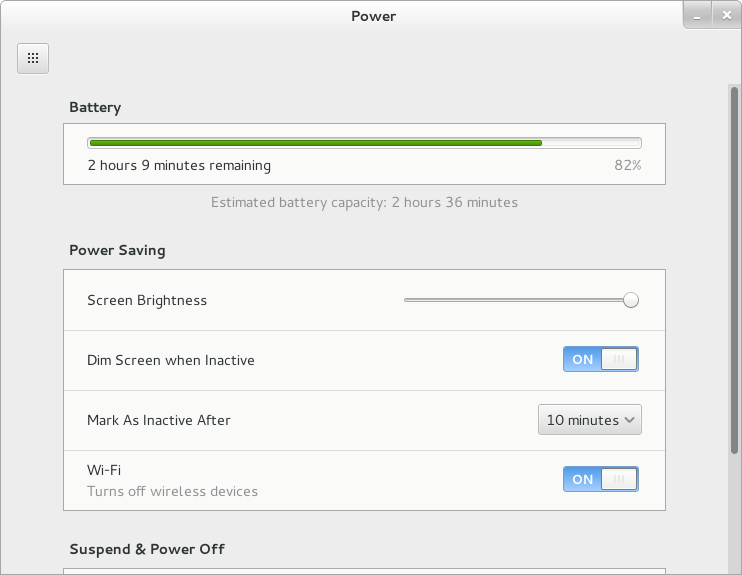
 I took this opportunity to update the Power panel in Settings, which shows off the temporary switch to the performance mode, and the setting to automatically switch to power-saver when low on battery.

Low-Power, everywhere

 Talking of which, while it's important for the system to know that they're targetting a power saving behaviour, it's also pretty useful for applications to try and behave better.
 
 Maybe you've already integrated with "low memory" events using GLib, but thanks to Patrick Griffis you can be an event better ecosystem citizen and monitor whether the system is in "Power Saver" mode and adjust your application's behaviour.
 
 This feature will be available in GLib 2.70 along with documentation of useful steps to take. GNOME Software will already be using this functionality to avoid large automated downloads when energy saving is needed.

Availability

 The majority of the above features are available in the GNOME 41 development branches and should get to your favourite GNOME-friendly distribution for their next release, such as Fedora 35.

Thursday, 10 September 2020

power-profiles-daemon: new project announcement

Despite what this might look like, I don't actually enjoy starting new projects: it's a lot easier to clean up some build warnings, or add a CI, than it is to start from an empty directory.

But sometimes needs must, and I've just released version 0.1 of such a project. Below you'll find an excerpt from the README, which should answer most of the questions. Please read the README directly in the repository if you're getting to this blog post more than a couple of days after it was first published.

Feel free to file new issues in the tracker if you have ideas on possible power-saving or performance enhancements. Currently the only supported “Performance” mode supported will interact with Intel CPUs with P-State support. More hardware support is planned.

TLDR; this setting in the GNOME 3.40 development branch soon, Fedora packages are done, API docs available:


Tuesday, 21 October 2014

A GNOME Kernel wishlist

GNOME has long had relationships with Linux kernel development, in that we would have some developers do our bidding, helping us solve hard problems. Features like inotify, memfd and kdbus were all originally driven by the desktop.

I've posted a wishlist of kernel features we'd like to see implemented on the GNOME Wiki, and referenced it on the kernel mailing-list.

I hope it sparks healthy discussions about alternative (and possibly existing) features, allowing us to make instant progress.

Tuesday, 22 October 2013

Reducing wake-ups, the 2013 edition

While doing work on UPower, trying to reduce its wake-ups when idle, I realised that a couple of applications on my desktop were waking up far more than should be necessary.

Detecting wake-ups

First, we need to detect wake-ups. This is a fairly well-known, and old, process, using the venerable PowerTop.

# powertop --html=/tmp/foo.html --time=60

You can increase the number of seconds to get a more realistic view of your machine's idleness, but this is enough to show the main culprits.

In my case, evolution, gnote and devhelp were all waking up about 30 times a second whilst mostly idle. Evolution might be an outlier, as it also talks to the network, and is a bigger application to debug, so I started with devhelp.

$ strace -vvv -p `pidof devhelp`
Process 19069 attached
restart_syscall(<... resuming interrupted call ...>) = 0
recvfrom(6, 0x23fece4, 4096, 0, 0, 0)   = -1 EAGAIN (Resource temporarily unavailable)
poll([{fd=5, events=POLLIN}, {fd=6, events=POLLIN}, {fd=3, events=POLLIN}], 3, 17) = 0 (Timeout)
recvfrom(6, 0x23fece4, 4096, 0, 0, 0)   = -1 EAGAIN (Resource temporarily unavailable)
poll([{fd=5, events=POLLIN}, {fd=6, events=POLLIN}, {fd=3, events=POLLIN}], 3, 17) = 0 (Timeout)

And the screen fills up with EAGAIN errors. This looks a lot like a a timeout being called too often.

Debugging wake-ups

I started sprinkling debug in g_main_context_prepare(), the function that prepares the various timeout and idle sources for dispatch, and calculates the timeouts for each poll() operation.

Something like:
if (source_timeout > 0 && source_timeout <= 20)
  g_message ("Source '%s' has very low timeout %d", g_source_get_name (source), source_timeout);

The problem is we end up getting a null source name for almost all of the sources. This is where g_source_set_name() and its sibling g_source_set_name_by_id() come in handy.

timeout_id = g_timeout_add (timeout, myfunction, mydata);
g_source_set_name_by_id (timeout_id, "[module-name] myfunction");

And we start doing that all over GTK+. As you can see from the patches in the bug, there's not just timeouts added by g_timeout_add() that we need to name.

In custody

The huge amount of debug shown when running our application with the gmain.c debug above tells us:
GLib-Message: Source 0x2d4f380 '[gtk+] gdk_frame_clock_paint_idle' has very low timeout 17
even when the window doesn't change, is in the background, and not updating. About 30 times a second.

Who are you gonna call?

Or by whom have you been called, rather. This is a small section of my ~/.gdbinit which will break on a particular function, print a backtrace, and continue. It makes it easier to interact with the logs after the fact, especially if they are calls that happen often and you're not interested in all the calls.

set breakpoint pending on
break gdk_frame_clock_begin_updating
commands
bt
continue
end

We did the same for gdk_frame_clock_begin_updating and found a backtrace similar to the one in Bugzilla. We only needed to start reading some code after that, and figuring out what was going on. The result was a bug in GTK+, likely a regression from GTK+ 3.8.

Your laptop should last a bit longer when the updates hit.

TL;DR

Name your timeouts with g_source_set_name_by_id(), run powertop, and file bugs against broken applications.

Update: Fixed powertop command-line.

Friday, 1 February 2013

Power management in GNOME 3.8

In the past couple of weeks, apart from reviewing very many patches for gnome-control-center (especially for new and re-designed panels), I've been working on updating the power management handling in GNOME.

Test suite

The first change is that we have a test suite (currently with 15 separate tests) to test interaction between gnome-settings-daemon's power management and various session and system components. This is thanks to Martin Pitt, and his work on python-dbusmock.

We'll try and add new tests as bug reports come in to avoid regressions, although some cases will remain untested because of limitations in our logging.

 All clear

Screensaver and backlight interaction

With gnome-shell becoming the sole screensaver (after the removal of fallback mode, and the obsoletion of gnome-screensaver), we've been able to streamline the code handling the various screen backlight power levels.

Your screen will now turn off as soon as the screensaver kicks in, moving your mouse in the screensaver will turn it back on for 20 seconds before turning off again, and when to dim (if you've chosen so) is dependent on whether you're on battery or not, and the default idle time (eg. if your screen turns off after 5 minutes of inactivity, the screen will dim after 4). This makes the behaviour more consistent, and predictable, compared to the mish-mash of settings we had before, where some delays were available for change in the UI, and others only through GSettings or gnome-tweak-tool.

Those constants are separate from the code, and exported to the test suite so they are flexible and can be changed if the behaviour doesn't exactly match what users are expecting.

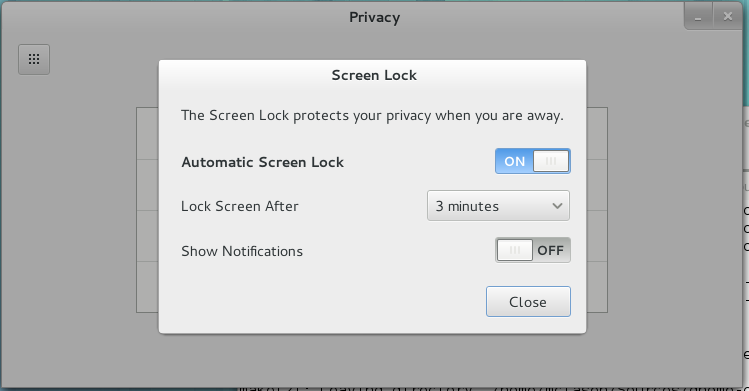
The other change relating to that, is that the screen shield will now always pop down when the screensaver kicks in (thanks to Giovanni for the gnome-shell work). This doesn't mean that you'll have to enter your password each time, but only after the "lock delay" if you've set one.

We've also added a number of nice touches, like the screen turning back on for a short period when you plug or unplug your laptop, made sure that your laptop screen gets turned off and your session locked when closing the lid and turn off the backlight for machines where suspend causes the backlight to come back on temporarily (as seen on MacBooks).

Very very idle

We've also added a long-requested feature: the ability to force logout after a period of idle. This is useful in kiosk and computer lab situations, and is only available through GSettings. As we've added support for this feature (warning prior to logging out, with the screen turning on for a couple of seconds when the warning shows up), we've realised that the infrastructure is the same for automatic suspend/hibernate situation. This means I expect to change the default "long idle" behaviour to suspending. This will still be changeable in the Power preferences. This should land after 3.7.5, and don't worry, we'll make this change very visible in the release notes :)

*I* am not suspending by default

Inhibit

But you don't want to suspend, you really don't.

GNOME supports the draft FreeDesktop "Idle inhibition" specification, as implemented by KDE, which hopefully means that more third-party applications should start behaving better when playing back films, in presentation mode, or for large overnight downloads. This should hopefully get out of draft status before the GNOME 3.8 release.

We also have a gnome-session-inhibit tool available in gnome-session for your scripting needs.

Colophon
 
All the changes mentioned should be available in GNOME 3.7.5, and I will be available to take complaints at FOSDEM this week-end.

Friday, 16 September 2011

OMG! I haz designed a bug fix!

In GNOME 3, we removed an option which got GNOME users hot under the collar (and gave the opportunity to the ones who weren't something to troll about): we removed the configuration option to select what happens when you close your laptop lid.

We started digging, and found out that the main reason for people wanting this feature was so that they could go from a table to another in the coffee shop, from their desk to the meeting room in the office, or a table to the next in the library, with the laptop lid closed, and your internet connection still on-going.

In that case, what's really needed is a way to disable suspending when you're moving the laptop. But having to dig in the settings would take too long anyway. And, apart from a number of tethered ones, users would live happily without that ability, so we wouldn't be adding this in the gnome-shell UI itself.

Let's add the button in a separate application. A single button isn't too interesting though. Let's make this more interesting!

Office Runner!

Testimonials

  • “this is the best thing ever”
  • “the most creative way I've heard of to solve a power management bug in a while”
  • “I expect people to spill their coffees over this”
What now?

The code is available in GNOME git, and we're just waiting to knock a few TODO items, and get a UI  review before releasing the first version. Patches welcome. Enjoy!